
If plain text feels too ordinary for a username, Instagram bio, caption, Discord profile, or message, cool lettering fonts can give it a more distinctive look in seconds. You can choose from bold, cursive, gothic, outlined, small -cap, bubble, and other decorative styles depending on the mood you want. Some styles feel clean and modern, while others are playful, dramatic, or cute.
This guide explains what cool lettering actually is, how copy-and-paste styles work, which styles fit different uses, and how to create your own text with a Cool text generator and get more variation of fonts.
Table of Contents
What Are Cool Lettering Fonts?
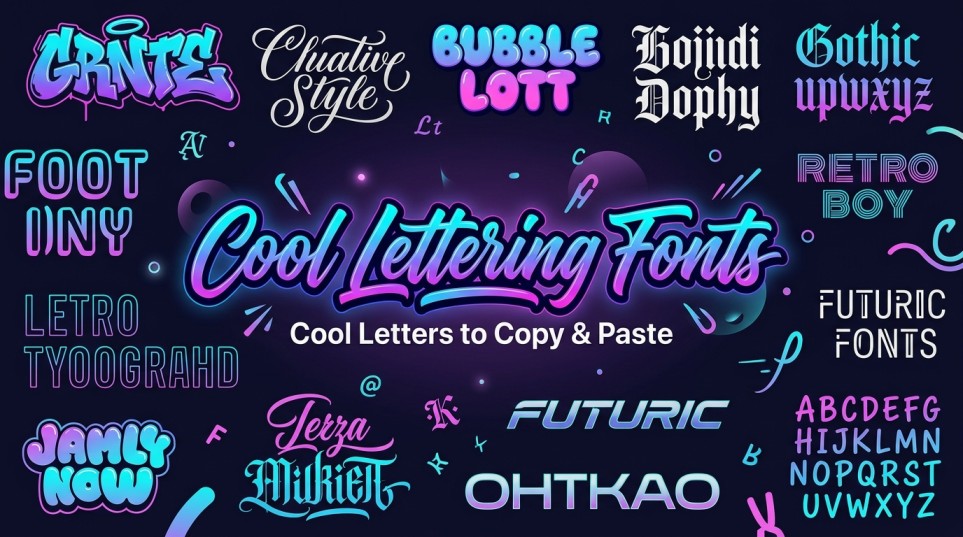
Cool lettering fonts are stylized versions of ordinary text designed to give names, phrases, bios, captions, and usernames a different visual character. For example:
- Plain: Cool Vibes
- Bold: 𝐂𝐨𝐨𝐥 𝐕𝐢𝐛𝐞𝐬
- Cursive: 𝓒𝓸𝓸𝓵 𝓥𝓲𝓫𝓮𝓼
- Gothic: 𝕮𝖔𝖔𝖑 𝖁𝖎𝖇𝖊𝖘
- Small caps: ᴄᴏᴏʟ ᴠɪʙᴇs
- Monospace: 𝙲𝚘𝚘𝚕 𝚅𝚒𝚋𝚎𝚜
Technically, many online “font” generators do not change the font installed on your device. They transform your text into Unicode characters that resemble different lettering styles. That is why you can often copy the result directly into a social profile or message field without downloading anything.
Why Do People Use Cool Lettering?
The main reason is simple: styled text can make a short piece of writing visually different from everything around it. Common uses include:
- Instagram and TikTok bios
- Social media captions
- Discord profiles and usernames
- Gaming names
- YouTube descriptions
- Messaging apps
- Personal profiles
- Short headings and decorative text
The best style depends on what you are trying to communicate. A bold style can make a username feel stronger, while cursive lettering can give a bio a softer appearance.
For longer paragraphs, however, decorative characters can make reading harder. Cool lettering works best when it is used selectively rather than applied to every word.
How to Get Cool Letters Copy and Paste
Creating cool letters copy and paste text does not require graphic-design software. A generator is usually the quickest option.
- Open a cool text generator.
- Enter the word, name, or phrase you want to style.
- Browse the generated lettering variations.
- Choose a style that fits your purpose.
- Copy the result.
- Paste it into the app, profile, caption, or message where you want to use it.
You can use the Cool Text Generator to generate different styles from the same text. It also includes variations such as a cursive generator and stylish text generator, which makes it easier to compare different looks before choosing one.
Popular Cool Lettering Styles
Not every cool font has the same personality. Here are some practical ways to choose.
Bold lettering
Example: 𝐒𝐭𝐚𝐲 𝐂𝐨𝐨𝐥
Bold styles are useful when you want words to stand out without making them difficult to recognize. They can work well for names, short headings, and emphasis.
Cursive lettering
Example: 𝓢𝓽𝓪𝔂 𝓒𝓸𝓸𝓵
Cursive styles have a handwritten or elegant appearance. They are a natural choice for aesthetic bios, romantic phrases, personal names, and creative profiles.
Gothic lettering
Example: 𝔖𝔱𝔞𝔶 ℭ𝔬𝔬𝔩
Gothic or Fraktur-style characters create a darker, more dramatic appearance. They can suit gaming names, music profiles, and edgy usernames.
Bubble or rounded lettering
Example: Ⓢⓣⓐⓨ Ⓒⓞⓞⓛ
Rounded and enclosed characters tend to feel playful. They can work particularly well for informal profiles, nicknames, and messages.
Cool Fonts vs. Aesthetic Fonts: What’s the Difference?
The terms overlap, but they usually describe slightly different design preferences. Cool fonts tend to emphasize personality, boldness, uniqueness, or an edgy appearance. Think gothic, bold, distorted, outlined, or unusual letterforms.
Aesthetic fonts are generally chosen to create a particular visual mood. Cursive, minimalist, soft, vintage, bubble, and elegant styles may all be described as aesthetic. That is why aesthetic fonts copy and paste search can produce many of the same styles as a search for cool lettering. The useful question is not which label is technically correct. It is which visual style matches the text you are creating?
How an Aesthetic Font Generator Works
An aesthetic font generator takes ordinary text and maps its characters to alternative Unicode characters that have a different visual appearance. Suppose you enter: Dream Big
A generator may provide versions such as:
- 𝐃𝐫𝐞𝐚𝐦 𝐁𝐢𝐠
- 𝓓𝓻𝓮𝓪𝓶 𝓑𝓲𝓰
- 𝔇𝔯𝔢𝔞𝔪 𝔅𝔦𝔤
You are not actually sending a new font file with the text. You are sending a sequence of characters that the receiving platform attempts to display using its available typefaces. This distinction matters because support can vary between platforms and devices.
When a Cute Font Works Better
Not every situation calls for bold or dramatic lettering. A cute font can be a better choice for playful usernames, friendship posts, personal bios, community profiles, or short messages. Cute styles often pair well with:
- Soft wording
- Hearts and simple symbols
- Short nicknames
- Friendly bios
- Playful captions
The important thing is moderation. Combining too many decorative characters, symbols, and emojis can make the final text harder to read.
Why Some Cool Lettering Does Not Work Everywhere
Copy-and-paste lettering is convenient, but it is not guaranteed to display identically on every platform. A few things can happen:
- A character may not be supported by the receiving app.
- Some platforms may restrict unusual characters in usernames.
- A device may display an unsupported character as a box or replacement symbol.
- Search, accessibility, or text-processing behavior can differ from ordinary letters.
For that reason, always check the finished text in the place where you intend to use it. If a particular style looks broken, switch to a simpler Unicode style. This is especially important for usernames and account handles, where platform-specific character restrictions may apply.
A Simple Way to Choose the Right Style
If you have several versions and cannot decide, match the lettering to the purpose:
| Your goal | Style to try |
| Strong and noticeable | Bold |
| Elegant or personal | Cursive |
| Dark or dramatic | Gothic |
| Subtle and modern | Small caps |
| Playful and friendly | Bubble or rounded |
| Decorative social profile | Aesthetic or mixed styles |
Keep the actual message short when using highly decorative lettering. A stylish username or two-word bio is usually easier to read than an entire paragraph converted into ornate characters
Create Your Own Cool Lettering
The easiest next step is to start with the exact text you want to use rather than searching for individual letters.
Open the Cool Text Generator, enter your name, phrase, username, or caption, and compare the available variations. If you want a flowing appearance, try its cursive option.
If you want something more decorative or distinctive, compare the stylish text variations. Once you find a version that is readable and fits the platform, copy it and test it where you plan to publish it.
Frequently Asked Questions
Are cool lettering fonts actual downloadable fonts?
Usually not. Many online generators create styled Unicode text rather than downloadable font files. The result can be copied and pasted as text, although the exact appearance depends on character and platform support.
Can I use cool lettering in an Instagram bio?
You can generally paste Unicode-styled text into fields that accept those characters, but individual platform rules and character limits still apply. Always preview the finished bio before saving it.
What is the easiest way to make stylish letters?
Use a text generator. Enter your text once, compare the generated styles, copy your preferred version, and paste it into the destination.
Why do some cool letters appear as squares?
A square or replacement symbol usually means the receiving device, application, or font does not support that particular Unicode character. Choose another, more widely supported style.
Is cursive lettering good for usernames?
Cursive can work well for display names and profiles when the platform accepts the characters. For usernames that need to be easy to search or type, a simpler style may be more practical.
What is the difference between a cool letter generator and a font generator?
In practice, the terms often describe similar tools. Both can transform ordinary text into stylized characters. The useful difference is the styles and controls the particular generator provides.
Can I make a cute version of the same text?
Yes. Enter the same phrase into a generator and compare playful, rounded, bubble, or other softer styles with the more dramatic options.
What should I do if my copied text looks wrong?
First, check the pasted result on the actual platform. If characters are missing or displayed incorrectly, choose another style with simpler Unicode characters. A readable alternative is usually better than forcing a style the platform cannot display.
Final Thoughts on Cool Letters
Cool lettering fonts are most useful when they solve a simple design problem: making ordinary text feel more distinctive without creating an image or installing a new font. Start with the words you actually want to publish, generate several styles, and choose the version that balances appearance, readability, and compatibility. For a quick way to compare bold, cursive, and stylish variations, use the Cool Text Generator and copy the version that fits your purpose.
Related tools
Fancy Text Generator – for decorative and fancy text variations
Toolbizhub offers a range of free calculators to help you quickly handle everyday calculations. Explore our collection of free calculators and find the right tool for your needs.