
Cool Text Generator: Easily Create Stylish Text to Copy & Paste
Turn ordinary words into cool, fancy, cursive, and stylish text variations. Enter your text, choose a category, decide how many results you want, and explore different styles
Cool Text Generator
Use the generator above to create different text-style variants from the same words. You can experiment with categories and decorative accents to find a style that fits your purpose.
What Is a Cool Text Generator?
A cool text generator converts ordinary text into different Unicode-based character styles that can look bold, cursive, decorative, fancy, or otherwise distinctive.
For example, ordinary text such as: Hello World
can be transformed into styles such as:
- 𝐇𝐞𝐥𝐥𝐨 𝐖𝐨𝐫𝐥𝐝
- 𝓗𝓮𝓵𝓵𝓸 𝓦𝓸𝓻𝓵𝓭
- 𝙷𝚎𝚕𝚕𝚘 𝚆𝚘𝚛𝚕𝚍
The exact variations depend on the styles available in the generator.
Why Use This Generator?
The tool gives you several variations from one piece of text, making it easier to find a style without manually searching for individual characters. You can use different text styles for:
- Social media bios and profiles
- Instagram captions and bios
- Discord profiles and messages
- Gaming names and profiles
- Usernames
- Creative posts and messages
- Decorative text
The generator also lets you control the number of results and choose a font category or decorative accent.
How to Use the Cool Text Generator
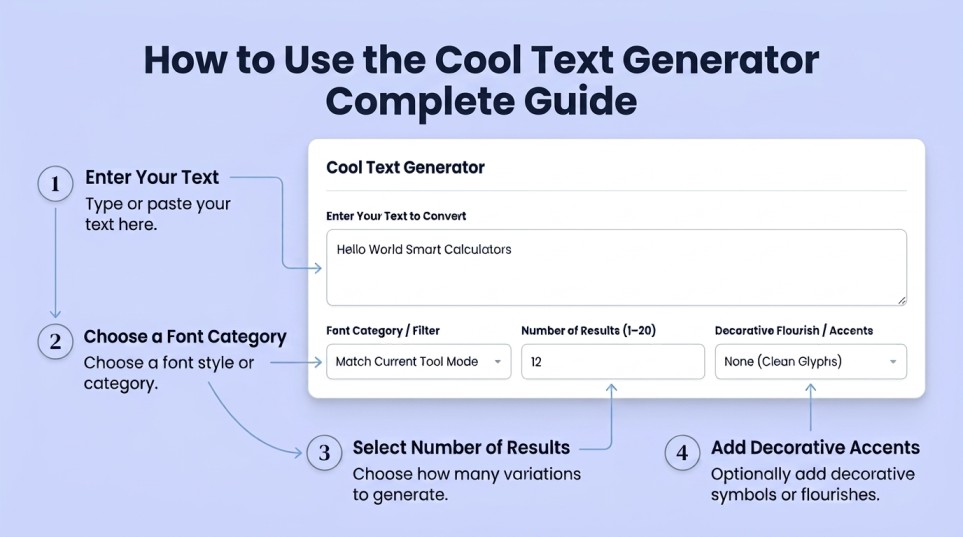
- Enter your text: Type or paste the words you want to transform into the Enter Your Text to Convert field. For example: Hello World Smart Calculators
- Choose a font category: Use Font Category / Filter to select the type of text styles you want to explore. If you leave it on Match Current Tool Mode, the generator follows the current mode.
- Choose the number of results: Set Number of Results (1–20) according to how many variations you want to see. A smaller number keeps the results focused, while a larger number gives you more styles to compare.
- Add decorative accents: Use Decorative Flourish / Accents when you want additional decorative character options. You can also leave it at None (Clean Glyphs) for a simpler appearance.
- Compare the generated styles: Review the different variants and choose the one that best fits your username, profile, gaming name, post, or other use.
How Does a Cool Text Generator Work?
Most cool text generators use Unicode characters rather than simply changing the font of a normal webpage.
Unicode provides characters that can have different visual forms. A generator combines appropriate characters to create a styled version of your original text. For example:
- Normal: Cool Text
- Styled: 𝘾𝙤𝙤𝙡 𝙏𝙚𝙭𝙩
The result is still text characters, which is why styled text can often be copied into places where you cannot install or select a custom font.
Cool Text Styles You Can Create
Depending on the selected category, you can explore different types of styles, including:
- Fancy text – decorative alternatives to ordinary writing
- Cursive text – flowing, script-like character styles
- Stylish text – distinctive variations for profiles and posts
- Bold-style text – stronger-looking characters
- Decorative text – styles that add visual character to your words
Instead of settling for the first result, generate several variants and compare them to find the appearance you prefer.
Cool Text for Gaming Names
A distinctive name can make a gaming profile or username look different from plain text. Try the generator with your gaming name and experiment with different categories. You can use the resulting styles for places that support the Unicode characters you choose.
For example:
- Normal: Shadow Hunter
- Styled: 𝑺𝒉𝒂𝒅𝒐𝒘 𝑯𝒖𝒏𝒕𝒆𝒓
Always check the final result on the game or platform where you intend to use it, because character support can vary.
Cool Text for Discord
You can experiment with stylish text for Discord usernames, profiles, messages, or other supported areas.
Generate a few variants first rather than using the same style everywhere. Simpler styles are often easier to read, especially in longer names or messages.
Cool Text for Instagram
Stylish characters can be useful when you want your Instagram profile text, bio, captions, or other supported text areas to have a different visual appearance.
For an Instagram bio, keep readability in mind. Highly decorative characters may look attractive but can be harder to read on smaller screens.
Cool Text for Usernames
A cool text generator can help you experiment with different versions of a username without creating completely different words.
Try: YourName
Then compare several generated styles to find one that matches your profile. Remember that each platform has its own rules about which characters can be used in usernames, so a generated result may not be accepted everywhere.
Cool Text Copy and Paste: What to Know
Styled Unicode text is designed to be treated as characters rather than as a special font installed on your device. This makes it possible to use many generated styles in applications and websites that support those characters.
However, copy and paste does not guarantee identical appearance everywhere. The receiving platform needs to support the particular Unicode characters used in the result.
If a style does not display correctly, try a simpler variant. Or check How to Create Cool text To Copy and Paste-complete guide
Compatibility and Limitations
Cool text is not the same as installing a new font on a website or device. The generated result uses characters supported by Unicode.
Because of that:
- Different platforms may display some characters differently.
- Some characters may not be supported by a particular app or game.
- Decorative styles can sometimes be harder to read.
- A platform may restrict which characters are allowed in usernames or profile fields.
- A style that works in one application may not work in another.
For the best result, test your chosen text in the place where you plan to use it.
Frequently Asked Questions
What is a cool text generator?
A cool text generator creates different visual variations of ordinary text using styled characters. It can produce fancy, cursive, and other stylish text variants for supported platforms.
How do I use the cool text generator?
Enter your text, choose a font category or filter, select the number of results you want, and optionally choose a decorative flourish. Then compare the generated variations.
Can I use cool text for gaming names?
Yes, you can generate different text styles for gaming names and try the variants on your gaming platform. Whether a particular style works depends on the game’s character support and username rules.
Can I use cool text on Discord?
You can try generated styles in supported Discord text areas. Character support can vary, so check how the result appears after using it.
Can I use cool text in an Instagram bio?
Yes, styled Unicode characters can be used in supported Instagram text fields. Simpler styles are generally easier to read, while very decorative characters may have compatibility limitations.
Why does my cool text look different on another device?
Unicode characters are rendered using fonts available on the device or platform. If a particular character is unsupported or rendered differently, its appearance may change.
Are cool text styles actual fonts?
Usually, no. Many online cool text generators create combinations of Unicode characters that resemble different font styles. They do not install or change the actual font used by your device or website.
Why doesn’t a generated style work everywhere?
Different websites, apps, and games support different sets of characters. If a particular style is not accepted or displays incorrectly, choose another generated variant with simpler characters.
Related Tools
Fancy Text Generator – for decorative and fancy text variations
More Tools
PC Wattage Calculator – Estimate the power requirements of your PC components.
Age Calculator – Calculate your exact age in years, months, days and hours