
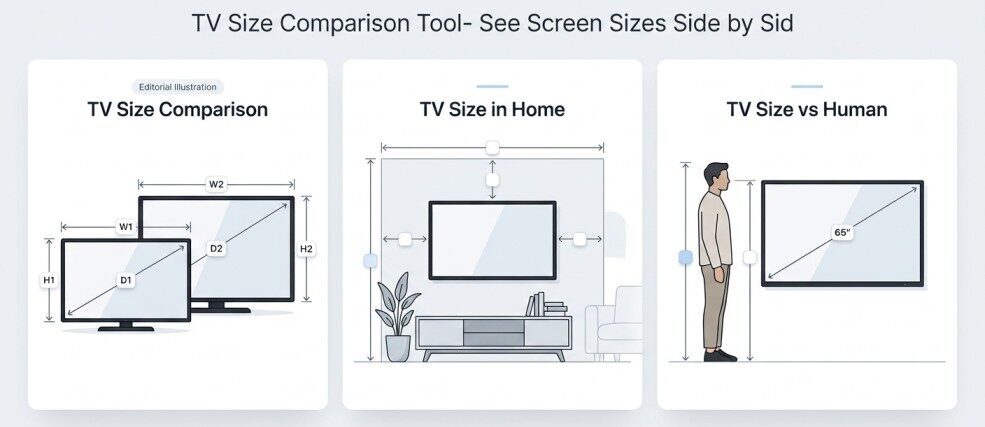
Tv size comparison has three modes. One compares two TVs directly, one places a TV on a wall, and one stands a TV next to a human figure. Choose what you want.
About TV Size Comparison tool
A TV listed as “55 inches” doesn’t tell you how much wall it covers, how it compares with a 65-inch model, or how large it looks next to a person. The number is a diagonal measurement, and a diagonal is hard to picture. This tool turns it into a scaled visual so you can see the difference.
It features three modes: one allows for a direct comparison between two TVs, another enables the TV to be mounted on a wall, and the third allows the TV to be placed next to a person. Each answers a different question, so pick the one that matches yours.
Table of Contents
How the Three Modes Differ
- TV Size Comparison is relative. It compares one TV with another and has no room or person.
- TV Size Comparison in Home is spatial. It compares a TV with a wall and shows what’s left over.
- TV Size vs Human is physical. It compares a TV with the human body.
Many people use them in that order: compare two candidates directly, put the leading one on the wall, then check it against a person for a sense of real scale.
How to Use the TV Size Comparison Tool
Using TV Size Comparison
- Choose TV A from the ready-made sizes, or select custom.
- Choose TV B the same way.
- If you want custom values, enter them using the Inches or Metric (cm) option.
- Drag either screen to overlap them or line them upside by side.
- Read the dimensions and size difference in the results panel.
Using TV Size Comparison in Home
- Select a TV size, ready-made or custom.
- Pick a wall preset to start with typical wall dimensions.
- Enter your own wall width and height if you want to match a real wall.
- Choose a TV placement option.
- Look at the wall drawing, then read the wall fit assessment and remaining clearance.
Using TV Size vs Human
- Select a TV size, ready-made or custom.
- Enter the person’s height.
- Choose a stance for the figure.
- Drag the TV around the figure to compare its height, width and position.
- Read the physical scale comparison in the results.
TV Size Comparison: Two Screens, Directly Compared
What it shows: Two TVs drawn at the same scale, with no room or person around them. You choose TV A and TV B from the ready-made sizes, or enter a custom size. If you select custom for both, the custom fields appear, and you can enter them in inches or centimeters.
The question it answers: “What is the real physical difference between these two sizes?”
Why it beats comparing diagonals: A 10-inch difference in diagonal sounds small, but screens grow in two directions at once. Going from a 55-inch to a 65-inch TV adds about 8.7 inches of width and about 4.9 inches of height (both 16:9 screen dimensions, explained below). The visual makes it obvious that the larger screen is bigger in both directions, and by more than the diagonal figure suggests.
Dragging the screens: You can drag either TV and overlap them, lining up a corner or the center. Placing the smaller screen inside the larger one shows exactly how much extra screen you would get. Placing them side by side shows how much more space the pair would need.
What the results panel gives you:
- TV Dimensions & Viewing Details: the width and height of each screen.
- Size Difference: how the two sizes differ.
What to pay attention to: Look at the width and height differences, not just the diagonal. Also check that both TVs are at the same aspect ratio before drawing conclusions, because two screens with the same diagonal can have different shapes (see below).
This mode is also the quickest way to run a 32-inch TV size comparison against a larger set. Choose 32 as TV A, choose the other size as TV B, and drag one over the other.
TV Size Comparison in Home: A Screen Against Your Wall
What it shows: A 2D wall drawn in proportion, with your chosen TV placed on it. Inputs are the TV size (ready-made or custom), a wall preset, a TV placement option, and the wall’s width and height.
The question it answers: “How much of this wall would this TV take up, and how much space is left around it?” A number like 65 inches means little until it sits against a wall of a known size. A TV that looks large on a store display can look modest on a wide living-room wall, and a TV that seemed reasonable on paper can dominate a narrow one. This mode gives you the scale reference.
Results: The results panel includes a wall fit assessment and the remaining wall clearance, so you can see the space left around the screen as well as the screen itself.
Reading the visual:
- The proportions matter more than any single number. How much of the wall’s width does the screen occupy? Is there a comfortable margin on both sides, or does it nearly reach the edges?
- Consider what surrounds the TV. Furniture, shelving, windows, and doors all change how big a screen feels. The drawing shows a plain wall, so picture those items alongside it.
- Placement changes the picture. Where the TV sits on the wall changes the clearance above, below, and to each side.
Limits to keep in mind: This is a scale reference. It does not tell you the best viewing distance, whether a particular TV is suitable for your room, or whether a mount or stand will work. It shows how a screen occupies a wall.
TV Size vs Human: Scale You Can Feel
What it shows: A TV drawn next to a human figure at the same scale. You choose the TV size (ready-made or custom), the person’s height, and the figure’s stance. Only the TV is draggable, so you can move it around the figure to see how it lines up.
The question it answers: “How big is this TV, in terms I can relate to?”
Inches are abstract for most people, but body height is something everyone knows. Put a 65-inch TV next to a person of average height and the screen turns out to be much shorter than many people expect: about 32 inches tall, less than half the height of someone who is 5’9″. The width, at roughly 57 inches, is a different matter, and the mode lets you see both together.
What to observe:
- Where the top and bottom of the screen fall against the figure’s body.
- How the screen’s width compares with the figure’s shoulders and outstretched arms.
- How the picture changes as you step through sizes such as 32, 43, 50, 55, 65, 75 and 85 inches.
Changing the person’s height or stance changes the reference, so you can match it to someone you know.
One caution: This comparison is about visual scale only. A person’s height has no bearing on which TV size is right for them, and the mode makes no such suggestion.
TV Size on a Wall
The wall mode is the fastest way to answer a question people search for often: how a screen size will look on a wall. Two measurements decide how much wall a TV covers, and they are the screen’s width and height, not the diagonal. A 65-inch screen is about 56.7 inches wide. On a wall that is 120 inches wide, it takes up roughly 47% of the width, leaving about 63 inches, or 31.7 inches per side if centered.
The plain drawing can’t show doors, windows, outlets, artwork, or the wall’s construction. It also assumes the wall dimensions you enter are the free space you have. Treat the visual as a scale reference. If you need to know whether a specific TV fits a specific space, compare the manufacturer’s overall dimensions with your measured wall or furniture space.
TV Size in a Room
A TV’s presence in a room comes from several things at once: how much wall it takes, how it relates to nearby furniture, and how it looks next to the people using the room. The tool helps you judge the first and third directly. For furniture, use the wall mode’s clearance figures with your own measurements of the sofa, cabinet or shelving.
This tool is about size visualization. It doesn’t calculate seating distance, and it doesn’t determine ideal room size or eye comfort. Those are separate questions, and this page does not answer them.
Worked Example: 55-Inch or 65-Inch?
Suppose you’re weighing a 55-inch against a 65-inch model.
In TV Size Comparison: Set TV A to 55″ and TV B to 65″. The 55-inch screen is about 47.9 × 27.0 inches and the 65-inch about 56.7 × 31.9 inches. That is 8.7 inches more width and 4.9 inches more height. The 65-inch screen also has about 40% more screen area (roughly 1,806 vs 1,293 square inches), which is more than the “10 inches” in the diagonal implies. Dragging one over the other shows this at a glance.
In TV Size Comparison in Home: Enter your wall, say 120 inches wide, and place each TV in turn. The 55-inch takes about 40% of the wall’s width and the 65-inch about 47%. You can see the remaining clearance and judge whether the larger screen still leaves the wall balanced.
In TV Size vs Human: Set a person height of 5’9″ (69 inches). The 65-inch screen is about 32 inches tall, a little under half the figure’s height. Dragging the TV beside the figure gives you a physical sense of both screens.
Three views of the same decision, none of which recommends a size. They show what each option would look like.
How TV Screen Size Is Measured
TV screen size is the diagonal: the distance from one corner of the visible screen to the opposite corner. It is not the width or the height.
For a standard 16:9 screen, width and height follow from the diagonal:
- Width ≈ diagonal × 0.8716
- Height ≈ diagonal × 0.4903
These come from the 16:9 shape (16 units wide, 9 tall, diagonal √(16² + 9²) = √337 ≈ 18.36 units).
Aspect ratio matters. The same diagonal gives different dimensions at different aspect ratios. A 55-inch diagonal at 16:9 measures about 47.9 × 27.0 inches. A 55-inch diagonal at 4:3 measures 44 × 33 inches: narrower but taller. Most current TVs are 16:9, so the table below uses that ratio.
You can read more about how display size is measured.
Screen Size vs TV Size
When someone says “a 55-inch TV,” they usually mean the screen diagonal. The physical product is larger than the screen, and the details differ by model:
- Screen size: the diagonal of the visible picture.
- Screen width and height: the visible picture’s horizontal and vertical measurements.
- Overall TV width and height: the screen plus the bezel and frame around it.
- Depth: how far the TV projects from the wall or the stand.
- Stand dimensions: the footprint of the stand or feet, which can be wider or narrower than the TV itself.
A 55-inch TV is not 55 inches wide. Its screen is about 48 inches wide, and the whole set is a little wider still, depending on the bezel.
The tool works with screen dimensions. When you need real product dimensions, such as for furniture, a shelf, or a wall gap, read them from the manufacturer’s specifications.
What a Visual Comparison Can and Cannot and Limitations
It can help you see:
- The relative size of two screens.
- Screen width and height, not just the diagonal.
- How much of a wall a screen occupies.
- How a screen compares with a person.
It cannot determine:
- Whether a specific TV physically fits a specific wall or cabinet.
- Viewing distance or viewing comfort.
- Mount compatibility, stand clearance, or weight capacity.
- Picture quality.
- Whether a particular TV suits a particular room.
Choose the Right TV Size Comparison Mode
| If your question is… | Use this mode | What you’ll see |
| “How much bigger is one TV than another?” | TV Size Comparison | Two screens at the same scale, which you can drag over each other |
| “How much of my wall will this take up?” | TV Size Comparison in Home | A 2D wall drawn to scale with the TV on it |
| “How big is this compared with an actual person?” | TV Size vs Human | A human figure next to a TV at the same scale |
The three modes are independent. Changing inputs in one mode does not change the others. You can move between them as your question changes, for example from “which of these two is bigger?” to “what would the bigger one do to my wall?”
Common Mistakes
- Assuming a 55-inch TV is 55 inches wide. It is about 48 inches wide at the screen.
- Comparing diagonals as if they were widths. A 10-inch diagonal difference is not a 10-inch width difference.
- Forgetting the bezel. The overall TV is wider and taller than its screen.
- Ignoring the stand. A stand can be wider than the screen’s footprint suggests, or narrower.
- Treating a visual as a guarantee of fit. Always check manufacturer dimensions against your measurements.
- Mixing up screen dimensions with product dimensions.
FAQ
How is TV screen size measured?
Diagonally, from one corner of the visible screen to the opposite corner.
How wide is a 32-inch TV?
About 27.9 inches (70.8 cm) of screen at 16:9. The overall TV is a little wider.
How wide is a 55-inch TV?
About 47.9 inches (121.8 cm) of screen at 16:9.
Does TV size include the bezel?
The advertised size refers to the visible screen. The bezel adds to the overall dimensions.
How can I see what a TV looks like on a wall?
Use the home mode: pick a TV size, enter your wall’s width and height, and choose a placement.
How accurate is a visual TV size comparison?
It is proportionally accurate for screen dimensions, assuming 16:9. It does not include bezels, stands, or mounting hardware, so check manufacturer specifications for exact product sizes.
Related Tools
The TV Size Comparison tool covers television screens. If your question is about a different kind of screen, these tools are a better fit:
- Screen Size Comparison: Compare any two screen sizes directly when they aren’t necessarily TVs, such as laptops, tablets, or phones alongside a television.
- Monitor Size Comparison: Compare desktop monitor sizes side by side. Monitors are often viewed from a much shorter distance and come in wider aspect ratios than TVs, so a dedicated tool makes sense.
- Curved Monitor Size Comparison: Compare curved displays, where the curve changes how the screen’s size and shape appear compared with a flat panel.