
Type a name, phrase, or caption above and the cool text generator returns the same text in a list of styled versions. Choose the one you like, copy it, and paste it into a bio, nickname, caption, or chat. You need only the exact words you plan to publish and a rough idea of where they’re going, since that decides which style is safe to use. This tool is for cool text copy paste when you want to see many options at once and filter them: cool text for Instagram bios, cool text for Discord display names, gaming tags, and short captions.
Table of Contents
How to Use the Cool Text Generator
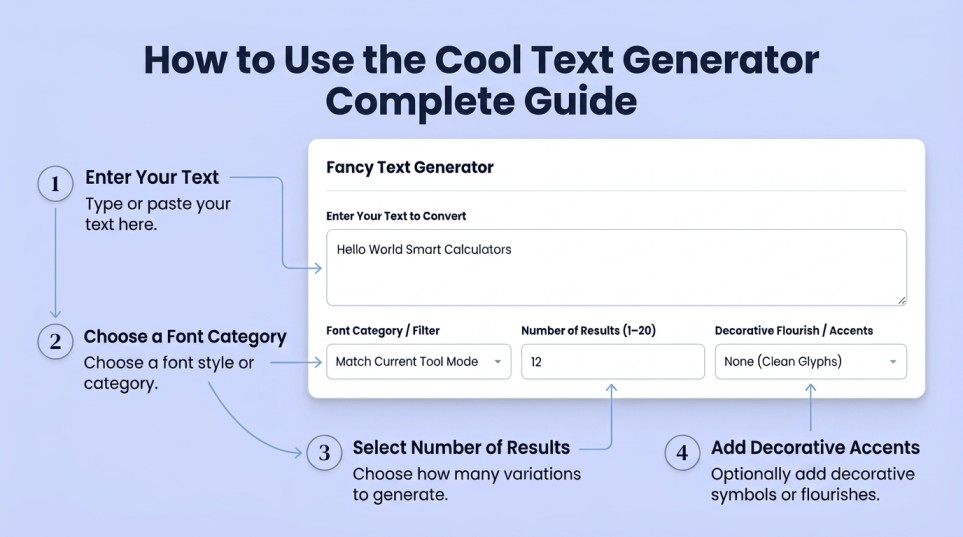
- Type your text into Enter Your Text to Convert. Use the final spelling and capitalization, because the tool converts exactly what you type. Keep it short: a name or a line, not a paragraph.
- Pick a mode with the selector at the top (Cursive, Fancy, or Stylish). This sets which kind of styles the list leans toward.
- Narrow the list with Font Category / Filter. Leave it on Match Current Tool Mode to follow the mode you picked. Choose a specific category, or All Available Categories, when you want to browse widely.
- Set Number of Results. A low number gives a short list you can scan quickly. Raise it when nothing fits and you want more to choose from.
- Choose a Decorative Flourish / Accent, or leave it on None (Clean Glyphs). Use “None” for anything with strict character rules, such as a username.
- Press Generate Text Styles, then use Copy Result next to the version you want. Reset clears the form.
If the copy button doesn’t work in your browser, select the line manually. On a phone, touch and hold the text. On a computer, highlight it and press Ctrl+C or Cmd+C.
Not sure which look suits your text? The cool lettering styles guide compares bold, cursive, gothic, and bubble lettering with examples, so you can decide before you generate.
Reading the Results
Each line in Converted Text Variations is one complete version of your text, not a piece of it. They are independent, so copy only the single line you want. The result is plain text made of special characters, so it pastes like any other text and keeps its look in most places.
Two things to check on every result before you copy it:
- Are your numbers styled? Some styles change digits, and some leave them plain. If a number looks out of place in the middle of a styled phrase, that’s why.
- Do accented letters survive? Letters like é or ñ often stay plain because many styles cover only the basic A–Z alphabet.
What Each Accent Adds
| Accent | Wraps your text with | Safe for usernames? |
| None (Clean Glyphs) | Nothing | Best option |
| Sparkles / Hearts / Butterfly | Emoji on both sides | No. Emoji look different on each device. |
| Aesthetic Brackets 【 】 | Wide corner brackets | Rarely accepted |
| Stars ★ | Star symbols | Rarely accepted |
| Aesthetic Cloud ・゚✧ | Half-width marks and a sparkle | Rarely accepted |
| Winged Ribbon ꧁ ꧂ | Javanese-script decorative marks | No. Some devices show empty boxes. |
Treat accents as decoration for bios, captions, and display names. If something looks broken after pasting, remove the accent first and keep the styled text.
Worked Example: Building an Instagram Bio
Suppose you run a small bakery and want the first line of your bio to stand out. Enter Sweet Crumbs, choose the Cursive mode, pick the Butterfly accent, and copy a script-style result. Then add two plain lines under it:
🦋 𝓢𝔀𝓮𝓮𝓽 𝓒𝓻𝓾𝓶𝓫𝓼 🦋
Small-batch cookies in Denver
Orders open Fridays ↓
(The exact look depends on which result you copy.) Now check the length before saving, line by line:
- Line 1: 🦋 (1) + space + Sweet (5) + space + Crumbs (6) + space + 🦋 (1) = 16
- Line 2: Small-batch (11) + space + cookies (7) + space + in (2) + space + Denver (6) = 29
- Line 3: Orders (6) + space + open (4) + space + Fridays (7) + space + ↓ (1) = 21
- Two line breaks = 2
Total: 16 + 29 + 21 + 2 = 68 characters.
Some counters count the special letters and certain emoji as two units each. That adds 11 styled letters and 2 butterflies, so the worst-case count is 68 + 13 = 81. That is still comfortably under Instagram’s 150-character bio limit, which is the main figure to check.
Worst-case count = visible characters + styled letters + emoji from the extended range. Hearts and butterflies count as two units in those counters, while ✨ and ★ count as one.
Where This Tool Helps
- An Instagram bio or name field where one distinctive line makes the profile easier to notice. This is the usual cool text for Instagram use.
- A Discord display name or server nickname with a styled look while the username stays plain. Cool text for Discord is best used on the name people see, not the handle they type.
- A gaming tag on platforms that accept extended characters.
- A short caption heading or a one-line status.
- Comparing options quickly when you don’t know what you want. Raising Number of Results lets you scan many versions from the same text in one pass.
Common Mistakes
- Styling the username or @handle. Many platforms accept only basic letters, numbers, periods, and underscores there. Style the display name instead.
- Typing over a styled result. If you retype one letter, that letter comes out plain in the middle of a styled word. Change the source text and generate again.
- Converting a whole caption. Styled text is hard to read at length. Use it for a name or a line.
- Pasting without checking. An accent that looks fine in the generator can turn into a box in an older app. Always look at the preview in the destination.
- Making your name unsearchable. A search for “Sweet Crumbs” typically won’t match the styled version. Keep a plain version of the name somewhere in the profile.
Cool Text vs. an Installed Font
A font changes how a program draws the letters it already has. Cool text is different: the tool replaces each letter with a different character that happens to look styled. This is why the result can be pasted into apps that have no font menu, and also why it can behave differently from normal text. It may count differently toward a limit, a screen reader may read it differently, and it won’t match a plain search. If you need a particular typeface on a website, a document, or a design, use a font. For a short-styled line in a social profile, a text converter like this is the practical option.
Most bold, script, gothic, and monospace letters come from a block of characters Unicode created for mathematics, listed in the Unicode code chart for Mathematical Alphanumeric Symbols
Accuracy, Assumptions, and Limitations
The tool does not know where you’ll paste the result or what that platform allows. It can’t tell you whether an app will accept, count, or filter a given character, and every device draws these characters with its own fonts. So, treat each result as a candidate to test, not a guarantee. Character limits and username rules are set by each platform and can change, so verify them in the app. When you see boxes or missing letters after pasting, the cause is almost always the destination app or device, not an error in the converter.
Practical Tips
- Paste multi-line bios from a notes app in one go so you can proofread the whole thing first.
- When a field has a character limit, add the worst-case amount from the example above before you commit.
- Send the final text to someone with a different phone and ask whether it looks right. Your own device is the least reliable test.
- Keep a plain copy of anything you style, so you can restore it quickly if a platform changes how it handles special characters.
Reference: What to Style Where
| Field | Styled text | Notes |
| Instagram bio / display name | Usually fine | Bio limit is 150 characters. The @username accepts only letters, numbers, periods, and underscores. |
| Discord display name / nickname | Usually fine | Nickname limit is 32 characters. The username accepts only lowercase letters, numbers, periods, and underscores. |
| TikTok bio / name | Usually fine | Check the in-app counter. |
| Game names | Varies | Many competitive games accept only basic Latin characters. Test first. |
| Email subject, resume, forms | Not recommended | Software and screen readers may mishandle it. |
Limits above are accurate as of this writing but can change, so confirm in the app.
Frequently Asked Questions
How do I copy and paste cool text on my phone?
Press Copy Result under the version you want, or touch and hold the text and choose Copy. Then touch and hold in the destination field and tap Paste.
Can I use cool text for Instagram without breaking my username?
Yes. Style your name or bio and keep the @handle plain, since the handle accepts only basic characters.
Does the cool text converter work for Discord?
It works in fields that accept extended characters, such as display names and nicknames. The username field has stricter rules.
Why did my bio’s character count go up after pasting?
Some counters treat styled letters and certain emoji as two units each. Check the app’s counter and trim plain text if you’re near the limit.
What does Number of Results change?
It sets how many versions are listed. It doesn’t change the quality of any single version; only how many you can compare.
Should I use “None (Clean Glyphs)” or an accent?
Use “None” for names and anything with character rules. Use an accent for bios and captions where decoration is welcome.
Can I get cool fonts copy paste results that look the same everywhere?
Not guaranteed. Each device draws the characters with its own fonts, so test in the app where you’ll publish.
Related Tools
If you want to compare an additional set of decorative looks, try the Fancy Font Generator. For a plain-English guide to style moods such as bold, cursive, and gothic, see the cool lettering fonts guide. For a name to style, the Random Pokémon Generator gives a quick nickname idea.
Ready to try it? Enter your text in the cool text generator above, compare a few versions, and test your favorite in the exact field you plan to use it in. That final check is what makes cool text copy paste work reliably. And for more tools please check out Text & Generators.