
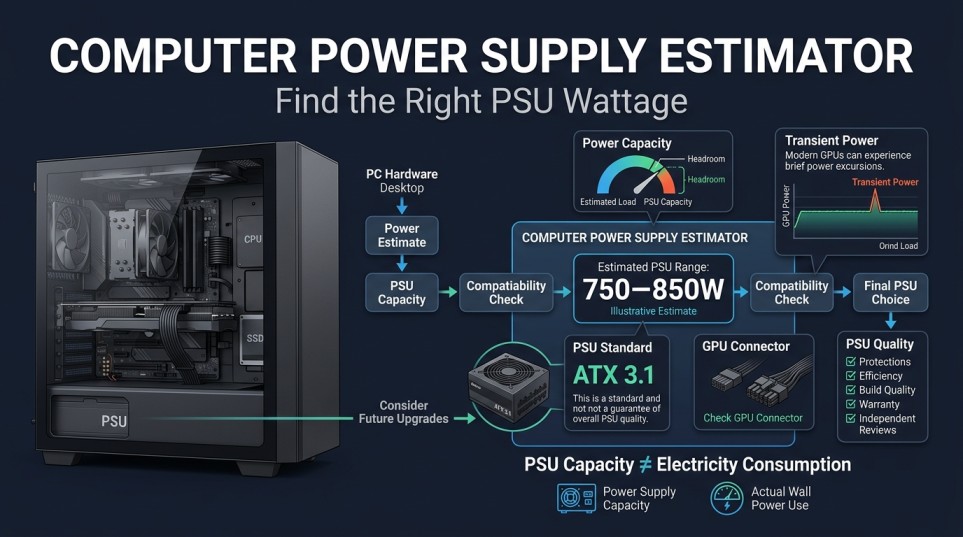
Choosing a power supply can feel deceptively simple: find a wattage number, compare it with a PSU, and move on. In practice, a useful computer power supply estimator needs to answer more than “how many watts?”
The real question is whether the PSU you are considering can handle your PC’s expected load, short power excursions, connection requirements, and the way you plan to use or upgrade the system.
This guide explains what to look for in a PSU estimate, why two calculators can produce different results, how modern GPU power behavior affects PSU planning, and how to interpret an estimate before buying a power supply. If you already know your components and want a result for your own build, you can use the PC Wattage Calculator as the practical starting point.
Table of Contents
What should a computer power supply estimator tell you?
A useful estimator should give you more than a single wattage figure. At minimum, the result should help you understand:
- The approximate power envelope your system needs.
- How much margin exists between expected demand and PSU capacity.
- Whether the PSU needs to cope with rapid changes in GPU power.
- Whether the PSU has the appropriate connectors for the graphics card.
- Whether the result makes sense for your planned workload and future upgrades.
That distinction matters because a PSU labeled “850W” is not simply a promise that every PC using less than 850W will behave identically. PSU design, standards, connectors, protections, and transient handling all matter.
A calculator is therefore best treated as a planning tool, not a substitute for checking the specifications of the actual PSU you intend to buy. The PSU before you buy check how much watt need your pc?
Why PSU estimates can differ between calculators
You may enter the same hardware into two tools and receive different recommendations. That does not automatically mean one is broken. The difference can come from the assumptions used by each pc power supply calculator.
For example, one estimator may use conservative headroom, while another may focus more closely on expected sustained demand. Some tools may also account for transient behavior or modern PSU standards, while simpler calculators produce a basic capacity estimate.
The underlying hardware data can differ too. CPU power figures may be represented using different manufacturer specifications, and graphics cards can have several relevant power measurements depending on the model and operating conditions.
The important question is not simply: “Which calculator gives me the lowest number?”
Instead, ask: “What assumptions produced this number?” A transparent estimate is easier to evaluate because you can see what the result is intended to represent.
The part many estimates miss: transient power
Modern graphics cards can change their power demand very quickly. A PSU therefore has to cope with brief power excursions rather than only a perfectly steady load. Intel’s published PSU design documentation describes defined power, excursion requirements, including substantially higher short-duration levels for systems using a 12V-2×6 connection. For example, its documented excursion table includes a 200% level for 100 microseconds for applicable supplies and configurations.
You do not need to calculate microseconds or transient ratios yourself. The practical lesson is simpler: A PSU estimate should leave room for the way modern hardware behaves, not just add up idealized steady-state numbers. This becomes particularly relevant when building around a powerful graphics card. A system can appear comfortable on paper and still place greater instantaneous demands on the PSU during rapid changes in GPU workload. That is one reason newer PSU standards are relevant when evaluating a modern build.
ATX 3.1 and 12V-2×6: why the standard matters
If you are building a new PC with a recent high-power graphics card, don’t look only at the wattage printed on the PSU box. Check the PSU’s supported standard and connector configuration as well.
ATX 3.x was designed around the behavior of modern PC loads, including defined power excursions. Intel’s documentation also identifies the 12V-2×6 connector as a significant part of the power – excursion requirements for PCIe add-in cards.
For a new build, a PSU with an appropriate native connector can also make cable planning simpler than relying on adapters. This does not mean every older PSU must immediately be replaced. Compatibility depends on the particular PSU, graphics card, connectors, and system configuration. The useful takeaway is to evaluate the complete power-delivery setup rather than treating “ATX 3.1” as a magic quality label.
What makes an estimate more useful?
A good PC wattage estimator should account for the context around your hardware.
- Your actual component models: “High-end CPU” and “high-end GPU” are too vague for serious planning. Different models can have substantially different power characteristics. The exact processor and graphics card therefore matter more than broad categories such as “gaming PC.”
- Your operating conditions: A PC that spends most of its time browsing the web has a different practical workload from a workstation rendering for hours. Likewise, a stock system and a heavily overclocked system should not necessarily be evaluated using identical assumptions.
- Future changes: If you are buying a PSU for a system that will remain unchanged for years, your estimate can focus on the current configuration. If a major GPU upgrade is likely, it makes sense to consider that before buying the PSU. Otherwise, you may save money today only to face another compatibility decision later.
- Connector requirements: Wattage alone cannot tell you whether a PSU physically supports the power connections your graphics card requires. Before purchasing, compare the PSU’s included cables and connectors with the graphics card manufacturer’s requirements.
- PSU quality and protections: Two PSUs with identical advertised wattage are not necessarily equivalent.
Look for a reputable unit with appropriate protection features, a suitable operating temperature rating, and reliable technical documentation. Professional PSU reviews can also reveal electrical behavior that a wattage calculator cannot measure.
Calculate computer power without confusing PSU capacity with electricity use
The phrase calculate computer power can mean two different things. One meaning is PSU sizing: determining what capacity the power supply should have. Another is electrical consumption: determining how much electricity the PC actually draws from the wall. Those are related, but they are not the same measurement.
A PSU’s rated capacity describes how much DC output it is designed to provide. Your electricity bill is based on energy consumed from the electrical outlet over time. This distinction is especially useful when reading calculator results. A recommendation such as “850W PSU” does not mean the computer continuously consumes 850 watts. If your goal is to estimate electricity costs, you need a different type of calculation based on operating hours and actual or estimated wall power.
Why efficiency matters when comparing PSUs
Efficiency describes how much of the electricity entering the PSU becomes usable output power, with the remainder becoming heat. Certification programs such as 80 PLUS provide efficiency requirements at defined load points. However, efficiency certification should not be treated as a complete measure of PSU quality.
A PSU’s wattage, efficiency, electrical performance, protections, noise characteristics, connector design, warranty, and platform quality are separate considerations. For that reason, a computer power supply calculator can help establish an appropriate capacity, but it should be only one part of the buying decision.
A practical example of interpreting an estimate
Imagine a calculator gives you a result suggesting that your planned system belongs around a particular PSU capacity tier. Don’t immediately interpret that as: “I must buy exactly this number.”
Instead, use the result as a decision point. Check three things:
- Does the capacity provide sensible operating margin?
- Does the PSU support the graphics card’s required connectors and standard?
- Is the specific PSU a reputable unit with appropriate protections and documented performance?
Suppose two otherwise suitable PSUs are available at nearby capacity levels. The better choice is not automatically the larger one. Consider the actual hardware, expected workload, future upgrade plans, connector requirements, PSU quality, and price. The estimator narrows the decision. It does not make the purchasing decision by itself.
When a PSU estimate deserves a second look
There are several situations where you should avoid blindly accepting a calculator result.
- Overclocking: Overclocking can change the power behavior of the CPU or GPU. If your settings are substantially different from stock operation, a standard estimate may be less representative.
- Unusual expansion hardware: Specialized PCIe cards, unusual storage arrangements, high-power external devices, or other non-standard hardware can fall outside the assumptions of a basic calculator.
- Very high-end GPUs: The more demanding the graphics card, the more important transient behavior and connector compatibility become.
- Older PSUs: An older PSU can have a perfectly adequate wattage rating while still being a poor match for a new graphics card because of connector availability, design generation, age, or other compatibility considerations.
- Unclear calculator assumptions: If a calculator gives you a surprisingly high or low recommendation but doesn’t explain how it arrived there, treat the result cautiously. Transparency is useful because it lets you identify whether the estimate matches your situation.
Common mistakes when using a PSU estimator
Choosing based on wattage alone
A large number printed on the PSU does not guarantee that the unit is appropriate for your hardware.
Treating the calculator as an exact measurement
An estimator produces a planning figure based on its inputs and assumptions. It cannot know every behavior of your particular system under every workload.
Ignoring connectors
A PSU can have sufficient total capacity and still be inconvenient or incompatible with the intended GPU power connection.
What should you do after getting an estimate?
If you already have your CPU and GPU selected, start by running the configuration through a PC power consumption calculator or wattage estimator to establish a reasonable planning range. Then verify the actual PSU you’re considering. Check:
- Rated continuous output.
- PSU standard.
- GPU power connectors.
- Required cables.
- Protection features.
- Operating-temperature specifications.
- Independent technical reviews.
- Warranty and manufacturer support.
For a straightforward build, this process is usually enough to turn a vague “how big should my PSU be?” question into a concrete purchasing decision. If you want to check your own configuration now, use the pc wattage calculator and use its result as the starting point for evaluating compatible PSUs.
FAQ
What is a computer power supply estimator?
A computer power supply estimator is a tool that helps determine an appropriate PSU capacity for a PC based on its hardware and selected assumptions. It is intended for planning rather than measuring the computer’s exact electrical consumption.
Is a PSU calculator accurate?
It can provide a useful estimate when its hardware data and assumptions are appropriate, but no calculator should be treated as an exact measurement of every possible workload. The quality of the input data and calculation method matters.
Why do two PSU calculators give different results?
They may use different hardware data, headroom assumptions, workload assumptions, or approaches to transient power. A transparent calculator is preferable because you can understand what its recommendation represents.
Should I consider transient power when choosing a PSU?
Yes, particularly with modern high-performance graphics cards. Modern PSU specifications include requirements for handling short-duration power excursions, so looking only at sustained load can give an incomplete picture.
Does an ATX 3.1 PSU automatically mean it is high quality?
No. ATX 3.1 describes a standard and its requirements; it does not by itself guarantee that every PSU is equally well designed. You should still evaluate the specific model’s electrical performance, protections, connectors, warranty, and independent reviews.
Can a PSU estimator tell me my electricity cost?
Not by itself. PSU sizing and electricity consumption are different questions. Estimating electricity cost requires information about wall power use, operating time, and your electricity rate.
What if my calculated requirement falls between two PSU sizes?
Use the estimate as a comparison point and consider the specific PSU, expected workload, transient behavior, connectors, and future upgrades. Moving to the next sensible capacity tier can be reasonable when the smaller option leaves little practical margin, but buying the largest available PSU is not automatically the best choice.
Conclusion
A good computer power supply estimator is useful because it turns a complicated PSU decision into a manageable starting point. But the wattage result is only one part of the decision. For a reliable choice, consider the estimate alongside transient power behavior, PSU standard, GPU connectors, operating conditions, future upgrades, and the quality of the specific PSU.
If you already know the components in your build, the next practical step is to run them through the PC Wattage Calculator, then use the resulting capacity range to evaluate actual PSU models.
Related Tools: Bottleneck Calculator – Check potential CPU and GPU bottlenecks.