
A GPA calculator makes this much easier. You enter your courses, credits, and grades, and the calculator does the math for you.
In this guide, you will learn how to use a GPA calculator step by step. We will also use a real example to show how a GPA is calculated on a 4.0 scale. If you are looking for a weighted GPA calculator, you will also learn how weighted GPA is different from a normal GPA and what information you need before using one.
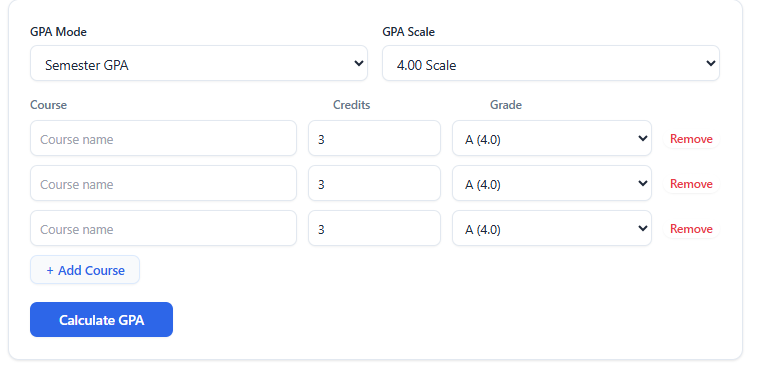
Table of Contents
What Is GPA?
GPA means Grade Point Average.
It is a number that shows how well you are doing in your classes. Your letter grades, such as A, B, C, and D, are changed into grade points. These points are then used to find your average. Some schools also use grades such as A-, B+, or C+. The exact points can be different from one school to another. For this reason, you should always check the grading system used by your school.
What Is a GPA Calculator?
A GPA calculator is an online tool that helps you find your GPA without doing all the math yourself. Most GPA calculators ask you to enter:
- Course name
- Course credits
- Your grade
- GPA scale
After you enter this information, the calculator works out your grade points and gives you your GPA. For example, if you have three courses and you received an A in all three, the calculator can quickly show that your GPA is 4.00 on a standard 4.0 scale.
How to Use a GPA Calculator
Using a GPA calculator is simple. You only need your course information and grades. Let’s go through it step by step.
Step 1: Choose Your GPA Type
The first thing you may see in a GPA calculator is the GPA Mode. See in below image. Your calculator has three options: Semester GPA Cumulative GPA (CGPA) & Weighted GPA. Choose the option that matches what you want to calculate.
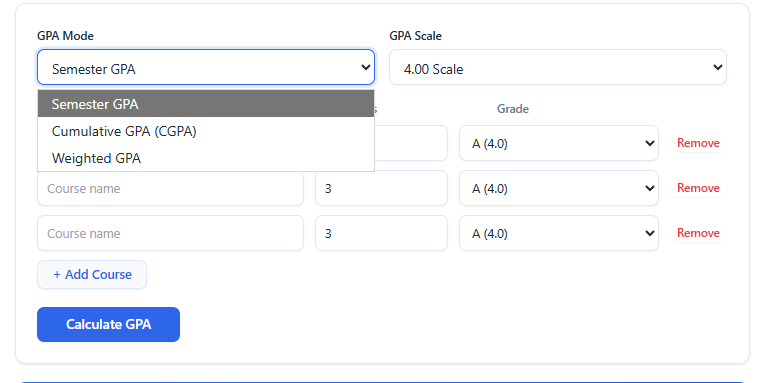
Semester GPA
Choose Semester GPA when you want to calculate your GPA for one semester. For example, if you have just finished your fall semester and want to know your GPA for those classes, you can use the semester GPA option.
Cumulative GPA (CGPA)
Cumulative GPA shows your overall GPA from several semesters or terms. For example, if you completed your first, second, and third semesters and want to know your overall GPA, you would use the cumulative GPA option.
Weighted GPA
A weighted GPA gives extra value to some harder classes. For example: some schools may give extra grade points for honors, AP, IB, or other advanced classes. The rules for weighted GPA are not the same at every school. You should check your school’s grading rules before calculating a weighted GPA.
Step 2: Choose Your GPA Scale
After choosing the GPA type, select your GPA scale.
A common option is the 4.00 scale. And in U.S. some school use deferent, like 5.00 Scale. Your school may use a different system, so always use the scale that matches your school.
Step 3: Add Your Courses
Now add the courses you want to include in the calculation. Your calculator lets you enter the course name, credits, and grade. For example, course:
- English
- Math
- Science
If you have more courses, click Add Course and enter the next course. You do not need to enter the course name if you only want to calculate the number, but adding the name can help you check your information later.
Real Example: Calculate a 4.00 GPA
Now let’s use the calculator shown in the screenshot to understand a real example. Example student: Imagine a student has three courses:
- Course 1: 3 credits, A
- Course 2: 3 credits, A
- Course 3: 3 credits, A
The student wants to calculate the semester GPA on a 4.00 scale.
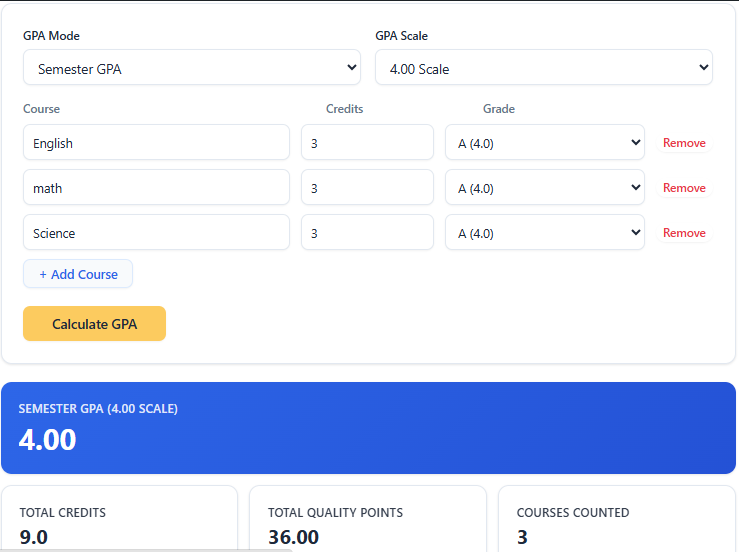
The screenshot shows:
- GPA Mode: Semester GPA
- GPA Scale: 4.00 Scale
- Number of courses: 3
- Credits for each course: 3
- Grade for each course: A (4.0)
- Total credits: 9.0
- Total quality points: 36.00
- Final GPA: 4.00
How This GPA Example Is Calculated
Each A has a value of 4.0 on the 4.0 scale. Each course is worth 3 credits. So, we calculate the quality points for each course: 3 credits × 4.0 grade points = 12 quality points
There are three courses: 12 + 12 + 12 = 36 quality points. The student has: 3 + 3 + 3 = 9 total credits
Now we use the GPA formula: GPA = Total Quality Points ÷ Total Credits
So: GPA = 36 ÷ 9, GPA = 4.00
That is why the calculator shows a 4.00 GPA. This is a simple example, but it shows the basic idea behind GPA calculation. And this calculation is based on the University of Michigan formula. Which is use our Calculator.
What Is a Weighted GPA?
A weighted GPA is different from a normal or unweighted GPA. In a basic unweighted GPA system, an A may be worth 4.0 points whether the class is regular or advanced. In a weighted system, some schools give extra points for harder classes.
For example, a school might give extra points for:
- Honors classes
- AP classes
- IB classes
- Advanced classes
The exact rules depend on the school.
Because every school may use different rules, there is no single weighted GPA system that applies everywhere. If you are using a weighted GPA calculator, make sure you know how your school gives extra points for advanced classes.
Weighted GPA vs. Unweighted GPA
The main difference is simple.
Unweighted GPA
An unweighted GPA does not give extra points because a class is harder. For example:
- A = 4.0
- B = 3.0
- C = 2.0
Weighted GPA
A weighted GPA may give extra points for certain advanced classes.
For example, your school might give a higher value to an A in an approved advanced class. Because schools use different rules, you should always check your school’s grading policy.
How to Calculate Cumulative GPA (CGPA)
Cumulative GPA, often called CGPA, is your overall GPA from multiple semesters.
It is important to understand that you should not always just add your semester GPAs and divide them by the number of semesters. Credit hours matter.
For example, imagine:
- Semester 1: 3.50 GPA with 15 credits
- Semester 2: 3.00 GPA with 12 credits
The two semesters have different numbers of credits.
A cumulative GPA calculation needs to consider the total quality points and total credits from the courses included in your overall record. This gives a more accurate result than simply averaging the two semester GPA numbers.
Common Mistakes When Calculating GPA
Even with a GPA calculator, you need to enter the right information. Here are some common mistakes to avoid.
1. Choosing the Wrong GPA Scale
If your school uses a 4.0 scale, do not use a 5.0 scale. Always check your school’s grading system first.
2. Entering the Wrong Credits
Check the number of credits for every course before calculating your GPA. Entering 4 credits instead of 3 can change the result.
3. Choosing the Wrong Grade
Make sure you select the final grade you actually received. For example, do not select A when your final grade was A-.
4. Mixing Semester GPA and Cumulative GPA
Semester GPA and cumulative GPA are not the same thing. Use Semester GPA for one semester and Cumulative GPA when you want to include your overall academic record.
5. Using the Wrong Weighted GPA Rules
Do not assume every school uses the same weighted GPA system. Your school may have its own rules for honors, AP, IB, or other advanced courses.
Frequently Asked Questions
What is a GPA calculator?
Answer: A GPA calculator is an online tool that calculates your grade point average using your grades and course credits.
How do I calculate my GPA?
Answer: Multiply the grade points for each course by its credit hours. Add all the quality points together and divide them by your total credits. GPA = Total Quality Points ÷ Total Credits
What is a 4.0 GPA?
Answer: A 4.0 GPA is the highest GPA on a standard 4.0 unweighted scale. It normally means that a student received A-level grades in the courses included in the calculation.
What is a weighted GPA?
Answer: A weighted GPA may give extra points to certain advanced classes. The exact rules depend on the school.
Is weighted GPA better than unweighted GPA?
Answer: They measure grades in different ways. A weighted GPA can show that a student took advanced classes, but colleges and schools may use different methods when reviewing GPAs.
Can I calculate GPA without credit hours?
Answer: You can find a simple average of your grades, but that may not be your actual GPA if your courses have different credit values. Credit hours are important for a credit-based GPA calculation.
What is the difference between GPA and CGPA?
Answer: GPA can refer to the average for a specific semester or period. CGPA usually refers to the overall average across multiple semesters. The exact meaning can vary by school or country.
Can my GPA be higher than 4.0?
Answer: Yes, if your school uses a weighted GPA system that gives extra points for advanced classes. Or, if your school use scale 5.00. A standard unweighted 4.0 scale normally does not go above 4.0.
Does every school use the same GPA scale?
Answer: No. Schools and colleges can use different grading scales and rules. Always check your school’s official grading policy before calculating your GPA.
Conclusion
Calculating your GPA does not have to be hard.
You need to know your grades, course credits, and the grading scale used by your school. A GPA calculator can then do the math and give you your result quickly.
For a simple example, three 3-credit courses with an A in each course produce 36 quality points from 9 credits, giving a 4.00 GPA on a standard 4.0 scale. If you need to check your semester GPA, cumulative GPA, or weighted GPA, you can use our GPA Calculator to make the process easier.
Remember that your school’s official grading policy and transcript are the final source for your official GPA. An online calculator is a useful way to check and understand your numbers.