
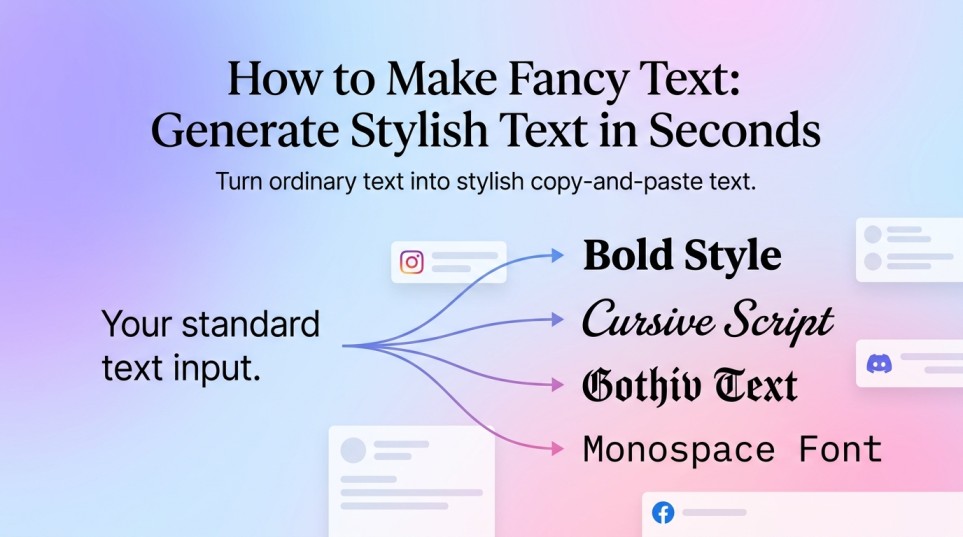
If you want to make fancy text for an Instagram bio, Discord profile, Facebook post, username, caption, or message, you usually do not need to install a new font. The easiest method is to convert ordinary text into alternative Unicode characters that look bold, cursive, script, gothic, monospace, or decorative.
For example:
- Normal: Hello World
- Fancy: 𝓗𝓮𝓵𝓵𝓸 𝓦𝓸𝓻𝓵𝓭
The practical process is simple: enter your text into a generator, choose a style, copy the result, and paste it where you want to use it. The main thing to understand is that these are generally characters rather than traditional font files, so their appearance and compatibility can vary between platforms and devices.
Table of Contents
How to make fancy text
The quickest way to make fancy text is to use a Unicode -based text generator.
- Write your normal text: Enter your name, phrase, caption, bio, or other short text.
- Generate different styles: A generator can produce variations such as bold, italic, script, gothic, double-struck, monospace, bubble, and other decorative styles.
- Compare the results: Choose a style that is attractive without making the text difficult to understand.
- Copy the version you want: You normally do not need to download anything.
- Paste it into your destination: Try the result in your Instagram bio, Discord profile, Facebook post, message, or another supported text field.
You can use the Fancy Font Generator to enter your text and compare multiple copy-and-paste styles. The tool is
How do fancy fonts work?
What people call a “fancy font” online is often not a font in the traditional sense. A normal font changes how ordinary characters are displayed. For example, the letter A remains the same underlying character while a font determines whether it looks serif, sans-serif, bold, handwritten, or something else.
Fancy text generators take a different approach. They can replace ordinary characters with other Unicode characters that have distinctive visual forms. For example:
- Normal: Hello
- Bold-style Unicode: 𝗛𝗲𝗹𝗹𝗼
- Script-style Unicode: 𝓗𝓮𝓵𝓵𝓸
- Monospace-style Unicode: 𝙷𝚎𝚕𝚕𝚘
Unicode contains sets of styled alphanumeric characters, including mathematical bold, italic, script, Fraktur, double-struck, sans-serif, and monospace characters. Although some of these characters were originally encoded for mathematical notation rather than decorative writing, they can also appear as styled text in applications that support them.
That explains why you can often copy fancy text from a website and paste it somewhere that does not offer a font selection menu.
An important distinction
A fancy text generator does not normally install a font on your phone or computer. Instead, it gives you a sequence of characters. The receiving app or device then decides how those characters are rendered. This is also why the same fancy text can look slightly different in different apps.
How do you generate fancy fonts?
You can generate fancy fonts in a few seconds:
- Open a fancy text generator.
- Type or paste your text into the input box.
- Look through the generated styles.
- Pick one that suits the purpose.
- Copy the styled version.
- Paste it into the website or app where you need it.
- Check the final appearance before publishing.
Suppose you want to style the name Creative Studio. You might generate variations such as:
- 𝐂𝐫𝐞𝐚𝐭𝐢𝐯𝐞 𝐒𝐭𝐮𝐝𝐢𝐨
- 𝑪𝒓𝒆𝒂𝒕𝒊𝒗𝒆 𝑺𝒕𝒖𝒅𝒊𝒐
- 𝓒𝓻𝓮𝓪𝓽𝓲𝓿𝓮 𝓢𝓽𝓾𝓭𝓲𝓸
- 𝔠𝔯𝔢𝔞𝔱𝔦𝔳𝔢 𝔖𝔱𝔲𝔡𝔦𝔬
- 𝙲𝚛𝚎𝚊𝚝𝚒𝚟𝚎 𝚂𝚝𝚞𝚍𝚒𝚘
The best choice depends on where you plan to use it. A simple bold or script style may work well for a profile name, while a highly decorative style may be better for a short caption or heading.
How to get fancy fonts on Instagram
If you are asking how to get fancy fonts on Instagram, the usual method is to generate the text outside Instagram and then copy and paste it into a supported text field. For example:
- Open a fancy text generator.
- Enter your Instagram bio text or caption.
- Select a readable style.
- Copy the generated result.
- Open Instagram.
- Paste the text into the relevant field.
- Preview it before saving or posting.
This approach is useful because you are pasting characters rather than trying to install a font inside Instagram. Keep important information readable. A decorative style can make a short name or heading stand out, but using unusual characters throughout a long paragraph can make the content harder to scan.
It is also smart to keep essential words, links, contact information, or instructions in ordinary text. Not every character style will render identically on every device or platform.
Using an aesthetic font generator
An aesthetic font generator is useful when you want more than simple bold or italic text. Depending on the generator, you may find styles inspired by:
- Cursive and handwriting
- Gothic or blackletter
- Small caps
- Bubble letters
- Monospace
- Double-struck text
- Full-width characters
- Decorative symbols
- Various combinations of letters and accents
The important question is not which style looks most complicated. It is which style fits the content. For an Instagram name, a clean script may be easier to recognize than an elaborate decorative style. For a short social post, a bolder design might provide enough contrast without becoming difficult to read.
Fancy text for Discord
A Discord Font Generator can be useful when you want to experiment with distinctive text for supported profile, server, channel, message, or display name areas.
The same basic process applies: Type → generate → choose → copy → paste → check.
Discord and other platforms may have their own rules about usernames, names, fields, and supported characters. A generated style that looks fine in the generator is not automatically guaranteed to work everywhere.
For Discord, simpler styles are often a practical choice for names that people need to recognize quickly. Decorative text can be reserved for shorter labels or messages. If one style produces missing characters, boxes, or an unexpected appearance, try another variation.
Fancy text for Facebook
A Facebook Font Generator can help you create styled text that you can copy into supported Facebook text areas. The process is again straight forward:
- Generate your text.
- Choose a style.
- Copy it.
- Paste it into the Facebook field.
- Check how it appears before publishing.
Compatibility is determined by the characters supported and rendered by the destination platform. A fancy style is therefore better treated as a text variation rather than a guaranteed visual font. For posts that contain important information, avoid making every word highly decorative. A little styling can add emphasis; too much can reduce readability.
Which fancy text style should you choose?
The right style depends on what you are trying to communicate.
| Use case | A practical style choice |
| Instagram bio name | Script, bold, or clean italic |
| Short Instagram caption | Bold, script, or decorative |
| Discord display name | Bold, gothic, monospace, or simple decorative |
| Facebook post heading | Bold or another easy-to-read style |
| Gaming name | Gothic, bold, monospace, or decorative |
| Short personal message | Script or light decorative text |
| Important information | Plain text or a highly readable style |
Think about readability first, decoration second. If someone has to stare at your username for several seconds to understand it, the style is probably doing too much.
Why fancy text sometimes does not work
Fancy text is not guaranteed to look identical everywhere.
Unicode defines characters, but the final glyph -the visual shape you see -is rendered by the fonts and software available on the device or platform. Unicode itself notes that mathematical alphanumeric characters can have variations in how they are displayed by different fonts. You may therefore encounter a few common problems.
Some characters appear as boxes
This usually means the destination does not have suitable support for the character being used. Try: a simpler style with more widely supported characters.
The style looks different after pasting
The generator and the destination may use different fonts or rendering systems. Try: paste the text into the actual destination before deciding whether the style works.
Some letters look normal
Not every fancy style has an alternative character for every letter, number, symbol, or language. Try: another style or keep the unsupported portions in ordinary text.
A username is rejected
Platforms can apply their own restrictions to usernames and profile fields. Try: a simpler character set or a different name format.
Fancy text vs. a traditional font
The difference is easy to understand:
- Traditional font: Changes the appearance of normal text within software that supports that font.
- Fancy text generator: Creates alternative characters that can often be copied and pasted into other text fields.
That difference is the main reason fancy text can be useful for social media. You are not asking Instagram, Discord, or Facebook to install a new font. You are providing text containing characters the platform may already know how to display.
Common mistakes to avoid
Using the most decorative style everywhere
More decoration does not automatically make text better. Highly unusual characters can make names and messages harder to recognize.
Ignoring accessibility and readability
Decorative characters can be harder for some people and software to interpret. Use styling selectively, especially when the message contains information people need to understand.
A simple way to make better fancy text
A good rule is to use fancy text for emphasis, not to hide the message underneath decoration. For example, instead of styling an entire bio:
𝓗𝓮𝓵𝓵𝓸 𝓪𝓷𝓭 𝔀𝓮𝓵𝓬𝓸𝓶𝓮 𝓽𝓸 𝓶𝔂 𝓹𝓪𝓰𝓮… you could keep most of the information simple and style only a name or short heading. This makes the distinctive text easier to notice while keeping the actual information easy to read.
Frequently Asked Questions
Is fancy text actually a font?
Usually, no. Online fancy text tools generally create alternative Unicode characters rather than installing a conventional font. The characters can then be copied and pasted into compatible applications.
Why does my fancy text look different on another device?
The destination device or application may use a different font or rendering system. Unicode characters identify the characters, but their visual appearance can depend on the software and fonts available for displaying them.
Can I use fancy text in an Instagram bio?
You can paste compatible styled Unicode characters into supported Instagram text fields. However, not every generated character is guaranteed to render or behave identically, so check the finished bio before relying on a particular style.
Can fancy text work on Discord?
Many Unicode-based styles can be used in supported Discord text fields, but compatibility and character restrictions can vary by field and platform. If one style does not work correctly, try a simpler variation.
Can I use fancy text on Facebook?
Compatible Unicode text can be pasted into supported Facebook text areas. As with other platforms, the exact appearance depends on the characters and how Facebook renders them.
Why are some letters not fancy?
A particular style may not contain a matching alternative for every letter, number, symbol, or language. A generator may therefore mix styled and ordinary characters, or provide different results depending on the text you enter.
Is fancy text searchable?
It depends on the characters and platform. Styled Unicode characters are not always equivalent to ordinary letters for search, matching, sorting, or other text-processing purposes. For important names and information, keeping a plain-text version can be safer.
The easiest answer: generate, copy, and check
Learning how to make fancy text is mostly about understanding the difference between a real font and Unicode-based styled characters. You enter ordinary words, generate alternative characters, choose a readable style, and copy the result into the platform you want to use.
The important part is not finding the most elaborate style. It is choosing one that works, remains readable, and fits the purpose. For a quick starting point for deferent style text, use the Cool Text Generator, generate several versions of your text, and test your favorite before publishing it.
More Tools
Bottleneck Calculator – Check potential CPU and GPU bottlenecks for a PC build.
PC Wattage Calculator – Estimate the power requirements of your PC components.